- Everpure Cloud Dedicated on Azure - Quick Launch
Everpure Cloud Dedicated on Azure - Quick Launch
In previous posts I have covered use cases on how to utilize Everpure Cloud Dedicated (EC Dedicated), but if we look back I haven’t explained how it can be deployed. This blog will cover how to quickly launch the pre-requisites and get your Everpure Cloud Dedicated deployed in Azure.
Introduction
If you are not familiar with the Everpure Cloud Dedicated, it is a purpose built block storage system that currently sits in Azure and AWS. There are many benefits and use cases you can find out here. While we do have an Azure ARM Template that deploys all the components of Everpure Cloud Dedicated, the underlying pre-requisites still have to be deployed prior.
Changelog
| Date | Change |
|---|---|
| 9/2/21 | Removed Duplicate Network Security Group Creation. GitHub PR |
Video Demonstration
What is the Everpure Cloud Dedicated on Azure Quick Launch?
The Azure Quick Launch is a HashiCorp Terraform Manifest I created that deploys a base configuration of resources within Microsoft Azure that need to exist before we can deploy Everpure Cloud Dedicated. To understand the pre-requisites we should review the Everpure Cloud Dedicated Deployment and Configuration Guide for Azure. This guide covers all the prequisites needed. Many customers either have existing Virtual Networks, Security Groups or Subnets defined. However, many customers who POC or Deploy EC Dedicated want to setup new resources for this. The Quick Launch will automatically setup the required resources using Terraform and deploy EC Dedicated into the subscription.
The required resources that the Azure Quick Launch will create are the following:
- New Azure Key Vault
- New VNET Peering Between TF and EC Dedicated Subnet
- Azure Resource Group
- Azure Virtual Network
- Azure Subnets for System, Management, Replication and iSCSI
- Azure Network Security Groups with required Inbound and Outbound ports
- Azure NAT Gateway and Public IP
- Azure Linux VM that can be used for troubleshooting or testing connecitivty to EC Dedicated
- Deploy EC Dedicated using the above created resources
Get the Everpure Cloud Dedicated on Azure Quick Launch
As of version 0.6.0 the cbs_array_azure resource has additional components and requirements. The updated requirements are that now when deploying with terraform, the machine running apply must have access to the management subnet of Everpure Cloud Dedicated. The Quick Launch will now setup VNET Peering so this connectivity is in place as long as your TF machine is also in Azure. Azure Key Vault is also used now to securely store credentials for pureuser so that automatic decommision and future credential management can be handled. Additional information on these changes is available in the documentation.
All the required Terraform files are located on GitHub.
To deploy you will also need an Everpure Cloud Dedicated license. This can be purchased directly through the Azure Marketplace or through Everpure as a PaaS subscription. A license can also be generated by your Everpure account team for a free trial or POC.
git clone https://github.com/PureStorage-OpenConnect/cbs-quicklaunch.git
Deploy the Everpure Cloud Dedicated on Azure Quick Launch
The Azure Quick Launch has been easily variablized and made dynamic so only minor information is needed for a full end to end deployment.
Azure Variables
| Variable | Description |
|---|---|
| azure_resourcegroup | Prefix to be used for all resources |
| azure_location | Azure Region to Deploy to |
| azure_client_id | Required for Authentication if not using az login |
| azure_client_secret | Required for Authentication if not using az login |
| azure_subscription_id | Required for Authentication if not using az login |
| azure_tenant_id | Required for Authentication if not using az login |
| azure_network_interface_ip_allocation | Dynamic or Static |
| azure_vm_size | Instance Size for Test VM |
| azure_vm_username | Username for Test VM |
| azure_vm_password | Password for Test VM |
| New azure_virtualnetwork_peer_name | VNET Name to Peer EC Dedicated VNET with |
| New azure_virtualnetwork_peer_rg | Resource Group the VNET Peer VNET is in |
Everpure Cloud Dedicated Variables
| Variable | Description |
|---|---|
| license_key | Everpure Cloud Dedicated License Key |
| log_sender_domain | Domain to be used for EC Dedicated |
| alert_recipients | Email Address to be used for EC Dedicated Alerts |
| array_model | EC Dedicated Model (V10MUR1 or V20MUR1) |
| zone | Zone in Region to deploy (1,2 or 3) |
| groups | Azure AD Group for JIT Approval |
| plan_name | The EC Dedicated Marketplace Plan Name |
| New plan_product | The EC Dedicated Marketplace Plan Product |
| New plan_publisher | The EC Dedicated Marketplace Plan Publisher |
| New plan_version | The EC Dedicated Marketplace Plan Version |
| New key_file_path | Private Key File Path for pureuser |
Once you do your terraform init, terraform plan and terraform apply in ~15 minutes all your resources including EC Dedicated will be fully deployed!
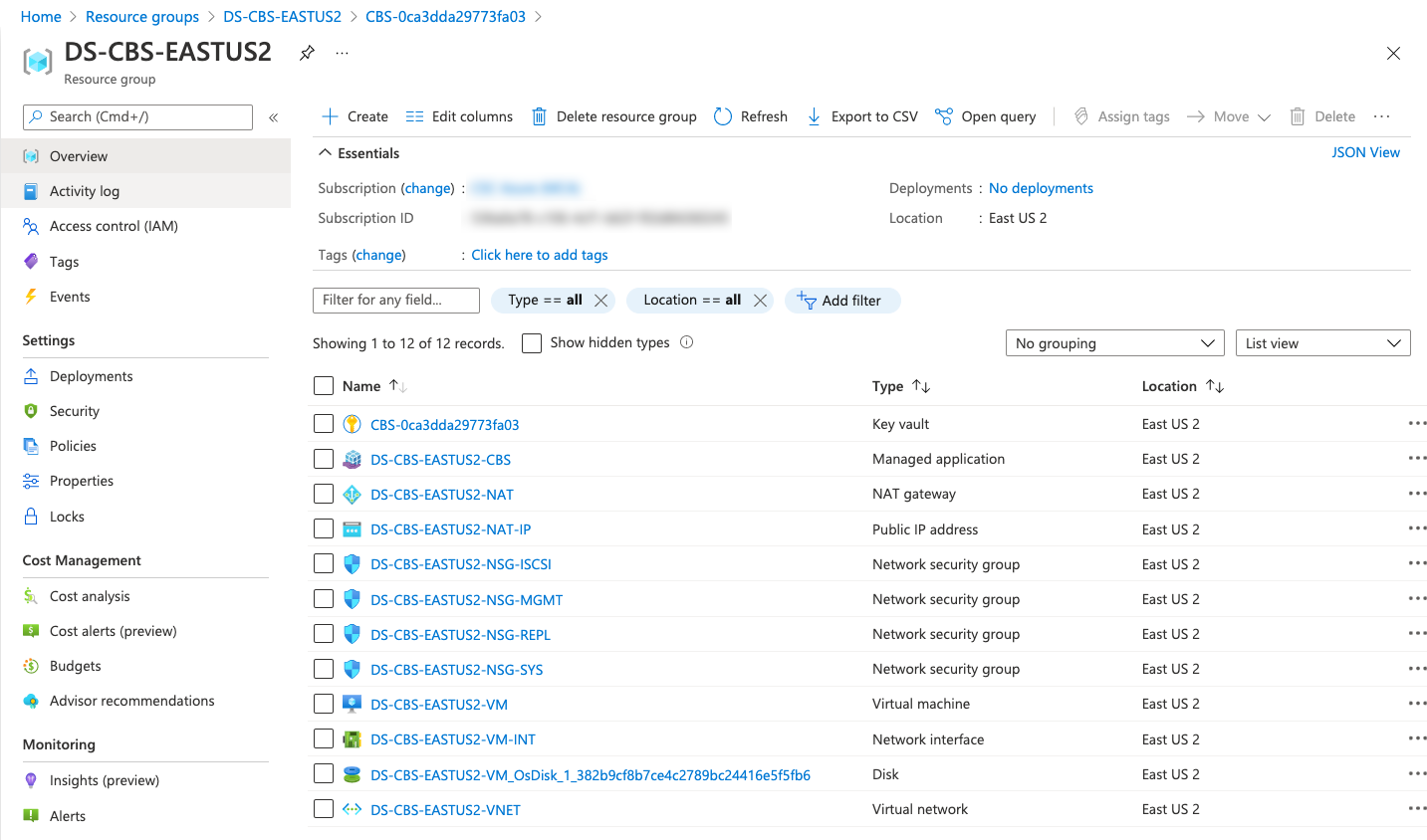
Destroy the Everpure Cloud Dedicated on Azure Quick Launch
Updated Destroy Steps for EC Dedicated on Azure as of Terraform Provider Version 0.6.0!
The EC Dedicated provider 0.6.0 now includes updates that allow for automatic decommission of EC Dedicated when the destroy operation is issued. This means if deploying and destroying with Terraform no manual/additional steps are needed.
You can review the latest Terraform Provider documentation which covers the updated requirements.
What’s Next?
This blog covered how to automate the deployment of EC Dedicated in Azure. Now take a look and see what else you can do with Everpure Cloud Dedicated. Will you run Production? Will you do Test/Dev? Will you do DR? It’s up to you. I have already discussed how you can cover some of these use cases so try them out and let us know what you think!
Conclusion
I love the idea of bringing enterprise storage features to the public cloud. This ease of deployment makes it even easier to consume Everpure Cloud Dedicated in Azure.
If you have any additional questions or comments, please leave them below!
comments powered by DisqusSee Also
- Using the Everpure Cloud Dedicated Terraform Provider for Azure
- Everpure Cloud Dedicated Use Cases for Microsoft Azure - Terraform Edition
- Deploying a Windows Azure VM with Hashicorp Terraform to Microsoft Azure
- Using the Everpure Cloud Dedicated Terraform Provider for AWS
- Deploying a Linux EC2 Instance with Hashicorp Terraform and Vault to AWS and Connect to Everpure Cloud Dedicated