What's New in the 5.0.0 Everpure Plugin for the vSphere Client
On July 28, 2021 Everpure released the latest version of their plugin version 5.0.0. Not only is this a new version, but it also runs on the new remote plugin architecture that VMware has released in vSphere 6.7U3 and vSphere 7.0+. This post will explore how to deploy and manage version 5.0.0 as well as discuss the latest features in this release! (Some are long awaited!)
Release Notes
The vSphere Client Plugin 5.0.0 runs on the latest Everpure VMware Appliance 3.2.0, formerly known as the Pure OVA (for VM Analytics).
What’s New in Everpure VMware Appliance 3.2.0
The latest Everpure VMware Appliance 3.2.0 has the following fixes and features:
- Add the option to configure the Everpure VMware Appliance as a vSphere Remote Client Plugin
- Fixed the issue that UnicodeEncodeError was in logs when run puresw upgrade
- Libraries update
What’s New in vSphere Client Plugin 5.0.0
The latest Everpure vSphere Client Plugin 5.0.0 has the following fixes and features:
- Role Based Access Control (RBAC)
- Yes it is back! A long awaited feature that customers have been asking for.
- All features from the vSphere Client Plugin 4.5.x
Bug Fixes
- Import Protection Group - Array Match not working
- Host Summary Widget data loading prevents navigating to other vSphere Objects
- Hosts shown as not connected incorrectly when more than one host was being connected via host group
Compatibility
- Minimum Plugin Version: Remote Plugin 5.0.0
- Installation Instructions for the vSphere Remote Plugin can be found here.
- Minimum Purity Version: 5.3.x
- Minimum vCenter Version: 6.7U3
- Plugin Appliance per vSphere SSO Domain
Pending Update from VMware, The Plugin is Certified it has just not been added to the VCG
You can view more detailed compatibility information on the VMware Compatibility Guide.
Feature Spotlight
With the release of new features its always great to see them in action! Let’s dive in to the new features of the 5.0.0 Plugin!
Installation of the Remote Plugin
The new plugin is no longer installed via PowerShell or the FlashArray. Just like VM Analytics an OVA is deployed that is use for installation and updates.
You can download the Everpure VMware Appliance 3.2.0 here
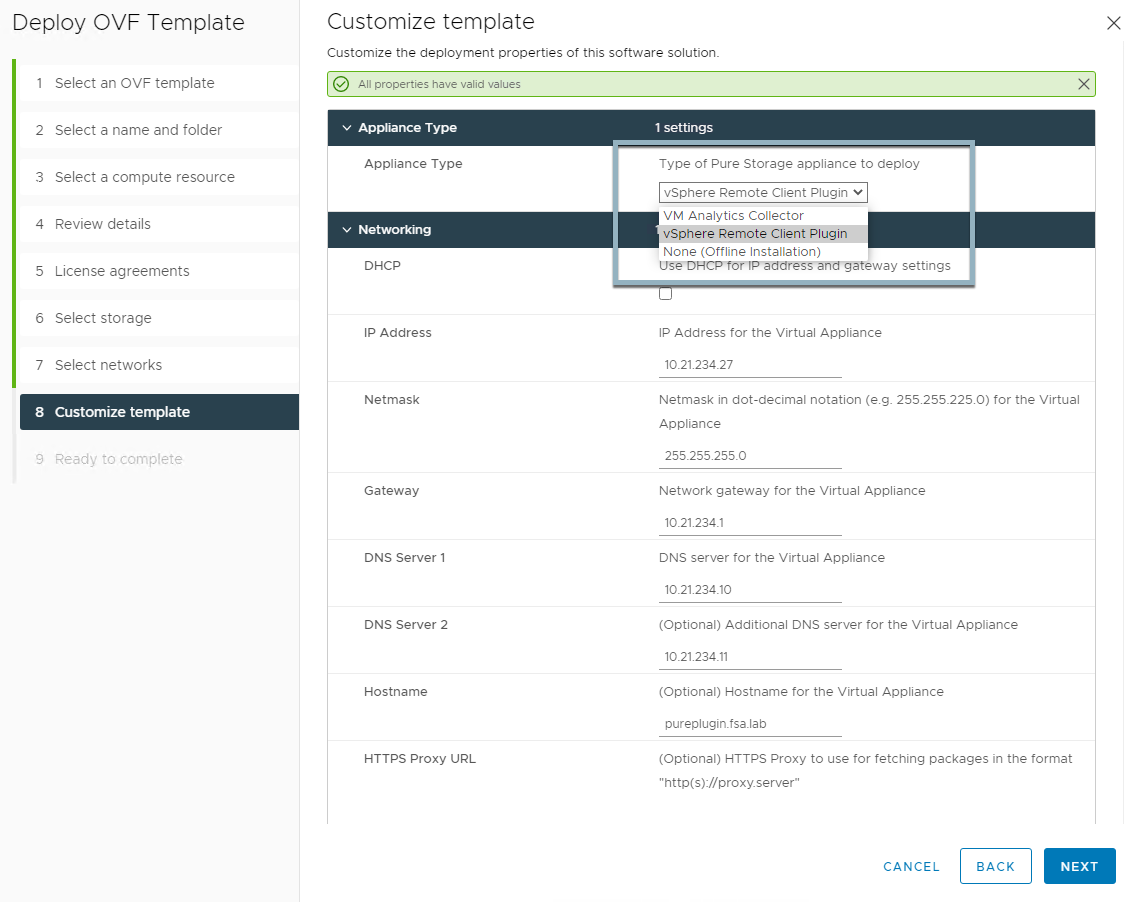
- Deploy the Everpure VMware Appliance OVA
- Download the OVA
- Deploy the OVA to vCenter Server
- Configure the VMware Appliance and Register the vSphere Plugin
- SSH to appliance using pureuser/pureuser You will be prompted to change the password on first login.
- Register vCenter Server and Install Plugin using the following command:
pureplugin register --host <IP_or_FQDN_of_vCenter> --user [email protected]

You can only register additional vCenter Servers that exist within the same SSO domain (linked mode) for additional non-linked vCenter Servers you will need to deploy an additional Everpure VMware Appliance
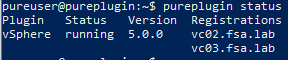
- Check Status of the current plugin registration. One Pure VMware Appliance can be used to register multiple on-premises vCenter Servers to install the plugin.
pureplugin status
- Unregister the vSphere Plugin
- SSH to appliance using pureuser
- Unregister and Uninstall the vCenter Server using the following command:
pureplugin unregister --host <IP_or_FQDN_of_vCenter> --user [email protected]
Role Based Access Control
A favorite feature has now returned! RBAC is now here for the vSphere Plugin. You can read more about how to use it and set/apply permissions here

In short we have now added new privledges that allow you to create a custom role. These apply to Administration, Host Management, Protection Group Management, Snapshot Management, VMFS Management and vVol Management.

Conclusion
This post has been an overview of all the latest features in the vSphere Client Plugin, which one is your favorite? Is there something you would like to see in a future release? Leave a comment below!
If you have any additional questions or comments, please leave them below!
comments powered by Disqus